
📊 Tap to view full-size PDF
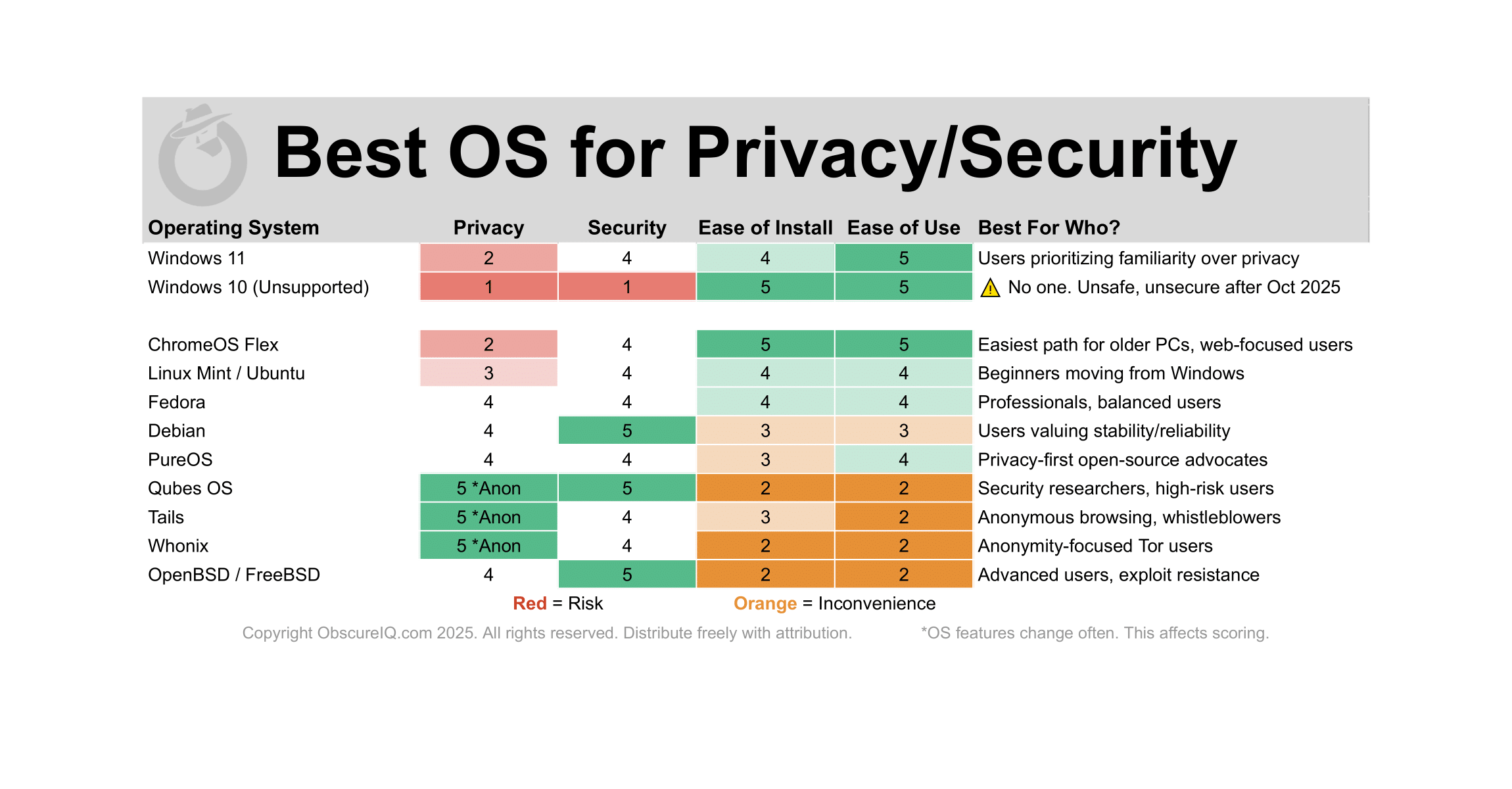
Operating System Comparison: Privacy, Security & Usability Trade-offs
| ⚠️ Doing Nothing Isn’t an Option Sticking with Windows 10 may feel easy, but once support ends, security patches stop. Every new flaw becomes a permanent opening for attackers. Unsupported Windows quickly turns into a liability. If your PC can’t run Windows 11, your safest move is to switch to a modern, supported system. |
⚫ Stay in Microsoft / Google Orbit (Easy Upgrade Paths)
ChromeOS Flex
Google’s lightweight OS for aging PCs and Macs. Secure by design, great for web-focused users.
- Best For: Anyone wanting a free, easy drop-in replacement
- Browser: Chrome only. Add uBlock Origin & Privacy Badger
- Key Differentiator: Easiest install and maintenance, weakest privacy
Linux Mint or Ubuntu
Beginner-friendly Linux with a familiar desktop and minimal telemetry.
- Best For: Windows switchers seeking stability and ease of use
- Browser: Brave for defaults, LibreWolf for hardened privacy
- Key Differentiator: Smoothest entry point into Linux
⚫ Privacy-Focused Linux Distributions
Qubes OS
“Security by isolation,” running apps in separate virtual Qubes. Gold standard for compartmentalized defense.
- Best For: Security researchers, journalists, or high-risk users
- Browser: Tor Browser inside Qubes; Mullvad Browser for better compatibility
- Key Differentiator: Malware in one app can’t spread across the system
Tails
Amnesic live OS routing all traffic through Tor. Leaves no trace once shut down.
- Best For: Activists, whistleblowers, or anyone needing strong anonymity
- Browser: Tor Browser only
- Key Differentiator: Nothing persists after shutdown
Whonix
Tor-based OS that separates the workstation from the gateway.
- Best For: Tor-heavy users needing strong IP leak protection
- Browser: Tor Browser by default; Brave or LibreWolf possible (still routed through Tor)
- Key Differentiator: Two-part design (Workstation + Gateway) to prevent IP leaks
⚫ Hardened General-Use Linux Options
Fedora Workstation
Cutting-edge Linux backed by Red Hat with timely security patches.
- Best For: Professionals, developers, and balanced users
- Browser: Brave for usability, LibreWolf for stronger privacy
- Key Differentiator: Combines strong defaults with regular updates
Debian
The gold standard for stability in Linux. Prioritizes reliability over bleeding-edge features.
- Best For: Users valuing long-term stability and trust
- Browser: Brave for daily use, LibreWolf for maximum privacy
- Key Differentiator: Rock-solid foundation with strict release cycles
PureOS
Debian-based OS from Purism with a strict open-source and privacy-first ethos.
- Best For: Open-source advocates and privacy-conscious users
- Browser: Brave or DuckDuckGo Browser
- Key Differentiator: Built entirely on free and open-source software
Linux Mint (hardened)
Mint configured with stronger privacy defaults and reduced telemetry.
- Best For: Beginners wanting comfort with added privacy
- Browser: Brave for daily use, LibreWolf for sensitive sessions
- Key Differentiator: Familiar Windows-like interface with hardened privacy
⚫ Specialized Private Ecosystems
- Best For: Advanced users prioritizing exploit resistance
- Browser: LibreWolf or Brave; Tor Browser for high-risk use
- Key Differentiator: OpenBSD is famous for its obsessive security posture
⚫ Windows
Windows 11Microsoft’s latest OS, with high usability but low privacy.
- Best For: Mainstream users prioritizing familiarity
- Browser: Brave or Firefox with extensions for improved privacy
- Key Differentiator: Easy, polished, but built on Microsoft’s data collection ecosystem
Soon-to-expire OS that becomes unsafe once updates end.
- Best For: ⚠️ No one — unsafe and insecure after support ends
- Browser: N/A (irrelevant due to systemic insecurity)
- Key Differentiator: Once support stops, every new vulnerability remains permanently exposed
How to Choose
- Ease First
- ChromeOS Flex, Linux Mint, Ubuntu
- Balanced Privacy + Usability
- Fedora, Debian, PureOS
- Maximum Security/Anonymity
- Qubes OS, Tails, Whonix
| Sidebar: What About Macs? macOS is a polished, secure operating system with strong exploit resistance and usability. For users already in Apple’s ecosystem, it can be a safe choice. However, it’s not a direct alternative for older PCs (new hardware is required), and while Apple emphasizes privacy, telemetry and account integration still limit true anonymity. |